

Table of Contents
- Introduction
- Why Moving Off Gmail Actually Matters
- What Microsoft 365 Plans Actually Cost in Kenya
- Where to Buy: Avoid the Grey-Market Trap
- How to Set Up Secure Domain Email – Part 1
- How to Set Up Secure Domain Email – Part 2
- The Bottom Line
- Frequently Asked Questions
- Ready to Move Off Gmail Securely?
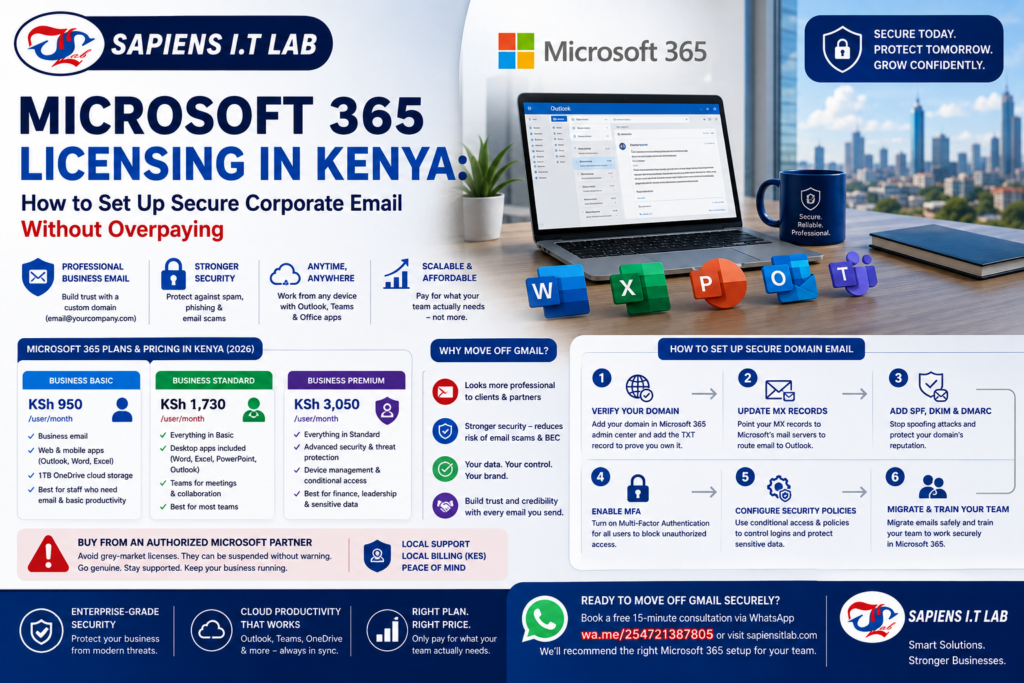
Microsoft 365 Licensing in Kenya: How to Set Up Secure Corporate Email Without Overpaying
Still sending invoices from a @gmail.com address? Clients notice, and so do scammers. Getting Microsoft 365 licensing Kenya businesses actually need not more, not less – is simpler than it looks once you understand the real pricing and the setup steps in the right order.
This guide covers exactly what to buy, what to skip, and how to set it up securely from day one.
Why Moving Off Gmail Actually Matters
A free @gmail.com address makes even a solid business look informal to clients and suppliers. However, the bigger issue is security, not appearance.
Free webmail accounts are the easiest target for business email compromise (BEC) scams, where criminals impersonate a company to redirect payments. In fact, most reported BEC attacks originate from free webmail services rather than properly configured corporate domains. A professional domain, set up correctly, closes off several of the tricks scammers rely on.
What Microsoft 365 Plans Actually Cost in Kenya
Kenyan Microsoft partners now bill in KES, which removes the currency fluctuation risk of paying in dollars. As of 2026, typical local pricing looks like this:
Business Basic – around KSh 950 per user/month. Web and mobile versions of Outlook, Word, and Excel, plus a business email address on your own domain. No desktop app installs.
Business Standard – around KSh 1,730 per user/month. Everything in Basic, plus fully installed desktop apps (Word, Excel, PowerPoint, Outlook) and Teams.
Business Premium – around KSh 3,050 per user/month. Everything in Standard, plus advanced security: device management, conditional access, and anti-phishing protection.
The overpaying mistake most SMEs make: buying Business Premium for every single employee “to be safe.” In practice, only your finance team, leadership, and anyone handling sensitive data typically need Premium’s advanced security. Reception or warehouse staff who only need email and basic documents are usually well served by Basic or Standard, which cuts your monthly bill significantly across a growing team.
Where to Buy: Avoid the Grey-Market Trap
Buy through an authorized Microsoft partner, not an unverified reseller offering suspiciously cheap “lifetime” licenses. Grey-market and counterfeit licenses can be suspended without warning, taking your entire company’s email down with them.
A genuine local partner also bills in KES, handles domain verification for you, and provides support during Kenyan business hours, worth the small premium over an anonymous online reseller.
How to Set Up Secure Domain Email, Step by Step
Step 1: Verify Your Domain
Add your domain inside the Microsoft 365 admin center, then add the TXT record it gives you to your domain’s DNS settings. This proves you own the domain before Microsoft activates email on it.
Step 2: Update Your MX Records
Point your domain’s MX (Mail Exchange) records to Microsoft’s mail servers. This is the step that actually routes incoming email to Outlook instead of your old provider. Plan for a short transition window when both old and new mail might arrive.
Step 3: Add SPF, DKIM, and DMARC Records
These three DNS records work together to stop criminals from sending fake emails that appear to come from your domain. Skipping this step is one of the most common and most dangerous corporate email mistakes.
SPF tells other mail servers which servers are allowed to send email for your domain.
DKIM digitally signs your outgoing email so receivers can verify it wasn’t altered.
DMARC tells receiving servers what to do with email that fails SPF or DKIM checks — reject it, quarantine it, or let it through.
Without these three records configured correctly, scammers can spoof your domain and email your own clients pretending to be you.
Step 4: Lock Down Access With MFA
Enable multi-factor authentication (MFA) for every account, not just leadership. This single step blocks the vast majority of account takeover attempts, even if a password is stolen through phishing.
If you’re on Business Premium, go further with conditional access rules for example, blocking sign-ins from outside Kenya unless someone is travelling and expected to log in remotely.
The Bottom Line
Getting Microsoft 365 licensing Kenya SMEs actually need comes down to three decisions: choosing the right tier per role instead of the most expensive one for everyone, buying through a genuine local partner, and configuring MX, SPF, DKIM, DMARC, and MFA properly from day one.
Get these right, and you move off @gmail.com with a setup that’s both more professional and considerably harder to compromise.
Ready to Move Off Gmail Securely?
Choosing the right license tier and configuring MX, SPF, DKIM, DMARC, and MFA correctly is easy to get wrong on your first try. Sapiens IT Lab’s managed IT services team handles the full setup – license selection, domain verification, mailbox migration, and security hardening so your team never touches a spoofed email.
Want the right Microsoft 365 setup for your team size, without overpaying? Book a free 15-minute consultation via WhatsApp or visit Sapiens IT Lab to request a free on-site IT assessment – we’ll recommend the right tier per role before you buy anything.
Frequently Asked Questions
How much does Microsoft 365 cost per user in Kenya?
Local partner pricing typically runs from around KSh 950 per user/month for Business Basic up to around KSh 3,050 for Business Premium, billed in KES.
Do all my employees need Microsoft 365 Business Premium?
No. Most SMEs only need Premium’s advanced security features for finance, leadership, and staff handling sensitive data – everyone else is usually well covered by Basic or Standard.
What are SPF, DKIM, and DMARC, and do I really need them?
They’re DNS records that verify your outgoing email is genuine and stop criminals from spoofing your domain to scam your clients. Yes, skipping them is one of the most common corporate email security gaps.
Is it safe to buy Microsoft 365 from any online reseller?
Only buy from an authorized Microsoft partner. Unverified “lifetime license” resellers sell grey-market keys that can be suspended without warning, taking down your entire company’s email.


